Apothecary Boss-Tracker
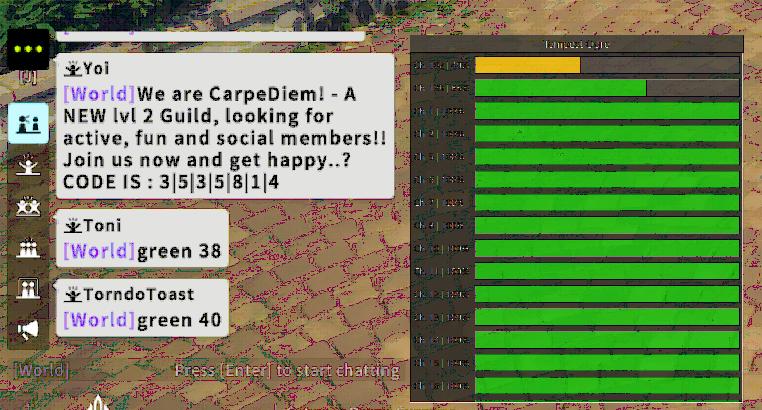
Real-Time Blue Protocol: Star Resonance -- Boss HUD.
What is this?
It's a game overlay {developed for the Apothecary Guild} that displays real-time boss HP information across all channels for each world-boss, helping you quickly find and target the bosses that are closest to death for easier and faster kills.
Think of it as a "boss scanner" that helps you optimize your channel hopping.
Features
- Floating Overlay: Sits ontop of your game-window.
- Hotkey Control: Show/Hide, click-through.
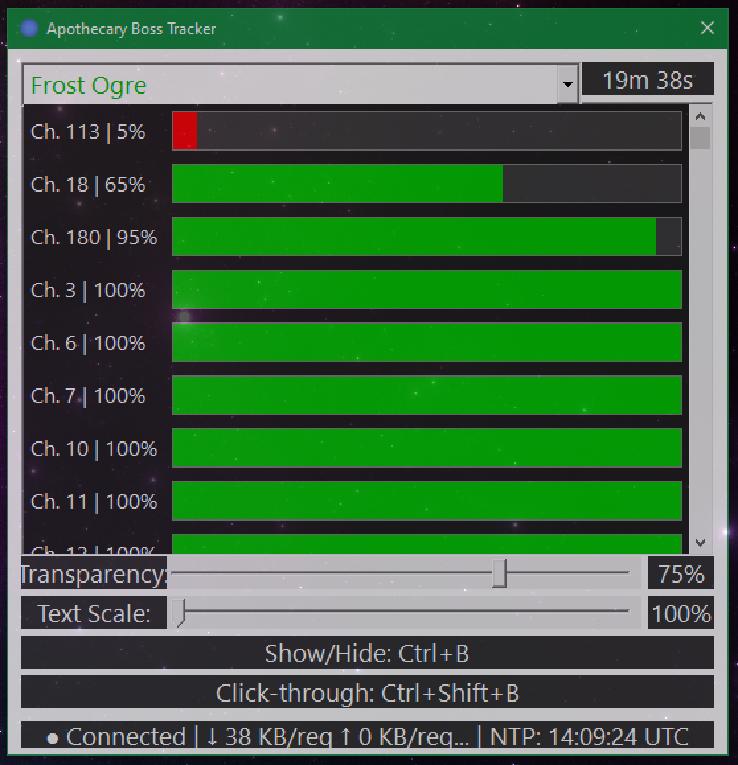
- Live Tracking: Real-time HP updates for the channels of the boss you're hunting.
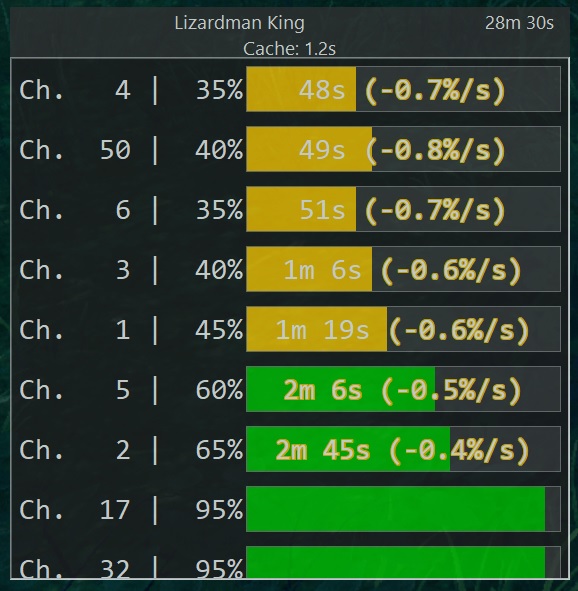
- Smart Sorting: EDT (estimated death-time), or HP fallback.
- Customizable: Adjustable opacity, text scaling, size, position, hunting target {boss}.
- Lightweight: Minimal dependencies, low overhead.
Quickstart Guide
First-Time Setup
There is none. Download, extract somewhere convenient, and run BossTracker -- that's it.
Window & Tray Icon
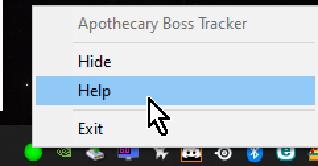
- The program opens as a floating window (always on top) and shows a system tray icon.
- Tray icon colors:
- Red = disconnected / idle
- Green = streaming data
- Double-click tray icon to show/hide the main window.
- Right-click tray icon for context menu and help.
Selecting a Boss
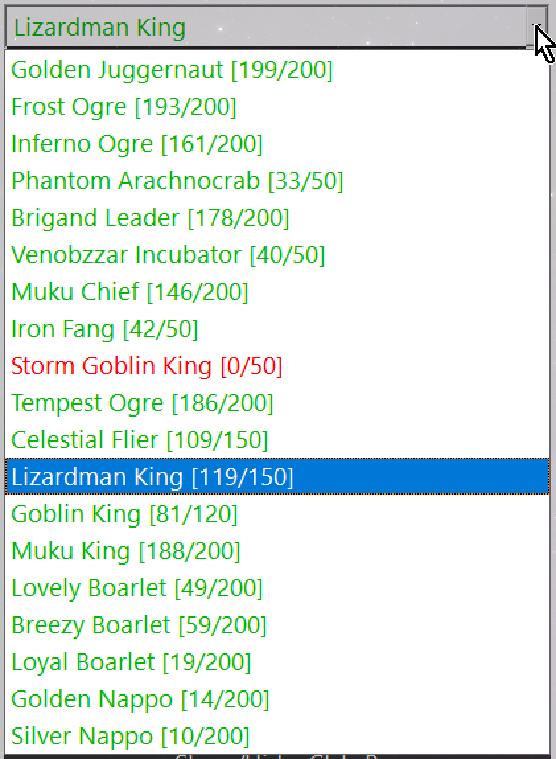
- Click on the dropdown (combobox) at the top of the window.
- A list of bosses will appear:
- Red entries = no known alive sightings
- Green entries = one or more channels thought to be alive
- Counters and colors update in real-time.
Customization
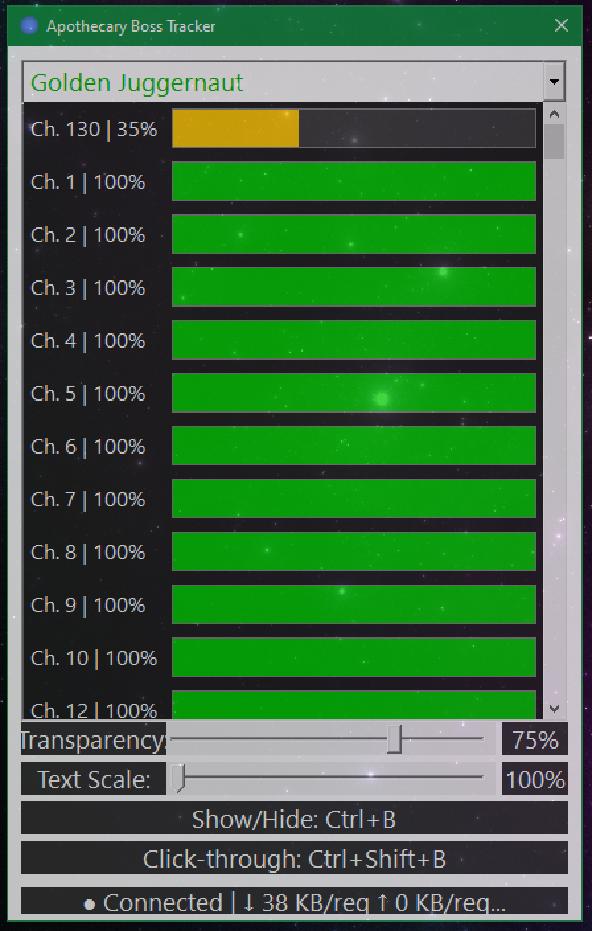
When the window is in focus, additional options appear at the bottom:
- Transparency slider: Right = more opaque, Left = more transparent.
- Text-Scale: Increases size of HP bars and health text.
- Hotkey rebinding: Click on Show/Hide or Click-through hotkeys to reassign them.
Click-Through Mode
Use this once you've positioned the overlay how you want it:
- Move the window into place.
- Select the boss you're hunting.
- Engage Click-through via hotkey.
This prevents accidental interaction with the overlay while gaming.
Reading the Display
- EDT (Estimated Death Time) and DPS displayed for a channel = strong indicator the boss is alive and data is valid.
- Sorting is based on EDT, with a fallback of HP.
- Boss reset time shown in upper-right corner.
Changelog
Bug Fixes
- Fix boss respawn times.
Bug Fixes
- Addressed DPI scaling related issues with the software and its menus.
- Fixed tray popup not showing on MultiMonitor setups where the SystemTray is on a display that does not match the DPI scaling of the primary.
- Port over latest widgets from Apothecary Chat project, adjust the UI to look more similar, and complete the Dark-Theme.
- Fix mouse-cursor persistence in boss-menu if click-through mode has never been disengaged on startup.
- Safety checks (clamping) so overlay can’t open off-screen or be sized larger than the screen (e.g. when stepping down resolution).
- Hotkey to open “Boss menu” (default Ctrl + A).
- Removed server timestamp clock sync (NTP as sole ground-truth).
- Removed system clock fallback in HP history tracking.
- Reworked report rejection, 'trust', and data filtering.
- Full "dark theme" UI with custom ownerdrawn slider, scrollbar, and Combox. (eliminate the mixture of light & dark elements outside of click-through mode)
- No more Combox flicker.
- Aligned boss status behavior to match bptimer.com (Alive/Dead/Unknown).
- Handle newer bptimer API changes.
- Improved sorting logic and algorithm to keep active bosses at the top of the list more stable.
- Optimized data usage and polling efficiency (compression, update packing).
- Fixed several bugs related to Boss HP tracking and display accuracy.
- Fixed a UI issue where the boss selection dropdown would sometimes close automatically when the window changed focus.
- Added sliding window based DPS and EDT (estimated death-time) calculation to the proxy-service, & support in the client.
- Sorting is now based on EDT. Client displays EDT and damage metrics when data appears reliable, with outliers automatically filtered in the sorting.
- Tweaked text-rendering and alignment in widget HP displays.
- Fixed an issue where HP metrics did not immediately update on combox selection change.
- Implemented a Cloudflare-aware caching proxy service. This should resolve the connection issues that people were facing.
- Added a cache-age display to the top of the widget.
- Added NTP client & internal / virtual clock (does not touch or rely on system-clock)
- Bosses now show next reset time in the upper-right corner, both in click-through and non modes.
Download
Latest Version (1.6.3)
File: Apothecary Boss Tracker_2026-07-18_025720.7z
Size: 329 KiB (337,100 bytes)
SHA1: 003e63076f15b85fee0f100c4d7be90bd6833000
Installation
There is no setup required. Simply download, extract the archive anywhere convenient, and run BossTracker.exe.
Contact
Issues, suggestions? You can DM me on Discord.
Credits
Acknowledgments
- Data source: bptimer.com
- Blue Protocol: Star Resonance
Bandai Namco Studios Inc.
Shanghai Bokura Network Technology
A Plus Japan Inc.